Scheduler Forced Run
Description
The Scheduler Forced Run automates solar router shutdown and forced run at a configured load power level during a time window.
This is a software-only scheduler with no additional hardware requirements. It works by controlling the main router activation and router level settings based on configured time schedules, ensuring the solar router remains robust even if the connection to Home Assistant is lost.
Use Cases
- Enable forced run of the load during off-peak hours (Router Level = 100 %)
- Deactivate the router and switch off the load to make room for other uses (Router Level = 0 %)
This scheduler exposes controls for customizing automation from the Home Assistant interface.
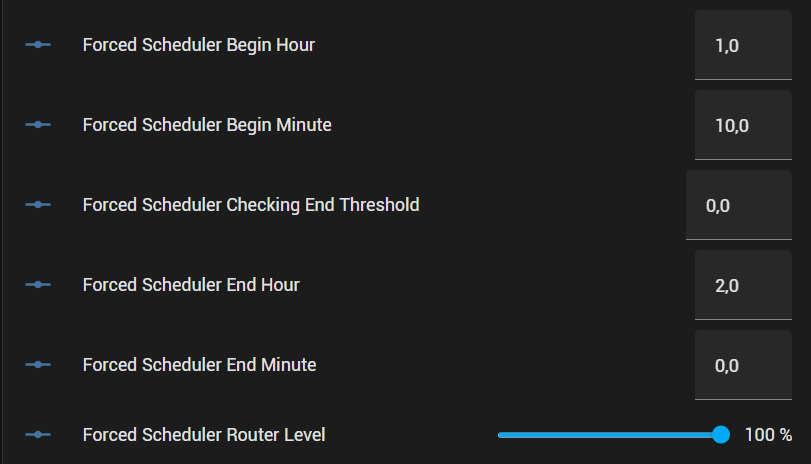
Controls
- Activate scheduler Controls whether the scheduler should be activated or not. This allows you to deactivate the scheduler according to your own criteria (e.g. if your water heater has already had enough power during the day, there is no need to force it to run at night).
- Begin Hour From 0:00 to 23:00. Time at which forced operation starts.
- Begin Minute From 0 minutes to 55 minutes, in 5-minute steps. If the start hour is 1 and the minutes are 15, then forced operation starts at 1:15.
- Checking End Threshold From 0 minutes to 720 minutes, in 5-minute steps. This option lets you define a safety margin to check every 5 minutes between the end of the schedule + X minutes that the router has returned to operation. For example, if the end time is set to 2:00 and the verification threshold to 60 minutes, every 5 minutes between 2:00 and 3:00 (inclusive) the scheduler will restart the solar router if it is stopped. This ensures that the schedule ends even if the ESP crashes at the end time.
- End Hour From 0:00 to 23:00. Time at which forced operation stops.
- End Minute From 0 minutes to 55 minutes, in 5-minute steps. If the end hour is 1 and the minutes are 15, then the forced run schedule ends at 1:15.
- Router level From 0 % to 100 % in 1 % steps. Defines the target level at which the router will be set while the scheduler is running between the start and end times.
Configuration
Simple configuration
To use a single instance of this package, add the following lines to your configuration file:
Multiple configuration
If you want several instances of this package, for example one forced operation during the day and another at night, add the following lines to your configuration file:
Advanced configuration (custom script)
This package can call a custom script every 5 minutes during schedule execution.
For example, to stop scheduling before the end time if a temperature sensor reaches a target value:
Variables
| Variable | Required | Default | Description |
|---|---|---|---|
scheduler_unique_id | no | "Forced" | Unique ID for this scheduler instance. Required when using multiple instances. Must not contain spaces or special characters. |
custom_script | no | ${scheduler_unique_id}_fake_script | Name of a script called every 5 minutes while the scheduler is running |