Temperature fan control
This package is designed to manage a fan with the objective to control the temperature of the solar router.
This module is reading the temperature from a temperature limiter. The fan can be configured to start spinning as soon as the start temperature is reached and stop spinning when the measured temperature comes below the stop temperature.
More about the mechanism avoiding regulation bouncing
The two thresholds regulation used here is named hysteresis. This mechanism avoids regulation bouncing.
See More details about hysteresis and Schmitt trigger in temperature_limiter page.
WARNING: Conduct some tests before letting the system regulate alone
This fan control logic may have some bugs. It is strongly advised to validate the behaviour of your system carefully before letting the system working by its own.
Prerequisites
This package is not standalone. It relies on symbols provided by two other packages that must be included in your configuration:
- an
engine_*package (e.g.engine_1dimmer.yaml) that provides theactivateswitch, - a
temperature_limiter_*package (e.g.temperature_limiter_DS18B20.yaml) that provides thesafety_temperaturesensor.
Cooling direction
The fan is meant to cool the object monitored by safety_temperature. Fan on when the temperature rises above fan_start_temperature, fan off when it falls below fan_stop_temperature. if you need the opposite behaviour, this package is not the right fit.
Threshold invariant
The two thresholds are coupled: fan_start_temperature > fan_stop_temperature is always enforced. If you change one of them to a value that would break the invariant, the other one is nudged automatically by 1 °C so a valid hysteresis is preserved:
- setting
fan_stop_temperatureto a value>=the currentfan_start_temperaturepushesfan_start_temperaturetofan_stop_temperature + 1, - setting
fan_start_temperatureto a value<=the currentfan_stop_temperaturepullsfan_stop_temperaturetofan_start_temperature - 1.
You can therefore edit either value in any order without ever landing on an invalid configuration.
Wiring
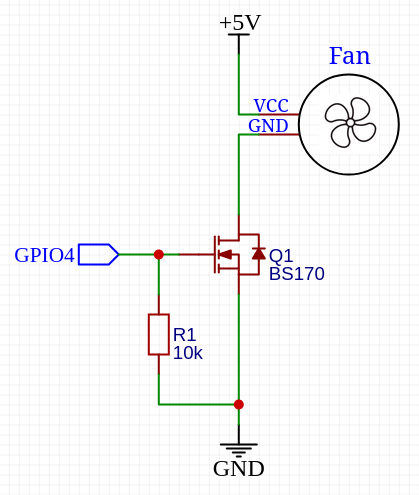
The energy available on a pin of the ESP32 is not sufficient to directly power the fan. It is then required to add an additional circuit to use 5V or 12V with the fan.
The following schematic represents the wiring of the fan:
Configuration
To use this package, add the following lines to your configuration file:
Variables
| Variable | Required | Default | Description |
|---|---|---|---|
fan_control_pin | yes | — | GPIO pin driving the fan control circuit. |
fan_control_inverted | no | "False" | Set to "True" if the driving circuit inverts the logic (e.g. active‑low transistor stage). |